“No Upfront Printing Costs” Cookbook Fundraiser: How Presales Work with Sales Hub
Most fundraisers start the same way: somebody brave volunteers to run it, everyone nods, and then reality shows up holding a clipboard full of costs.
With a cookbook fundraiser, that “reality” is usually printing. Traditional cookbook fundraising often asks you to pay for a print run up front… and then hope you sell enough copies afterward to get your money back (and raise funds on top of it).
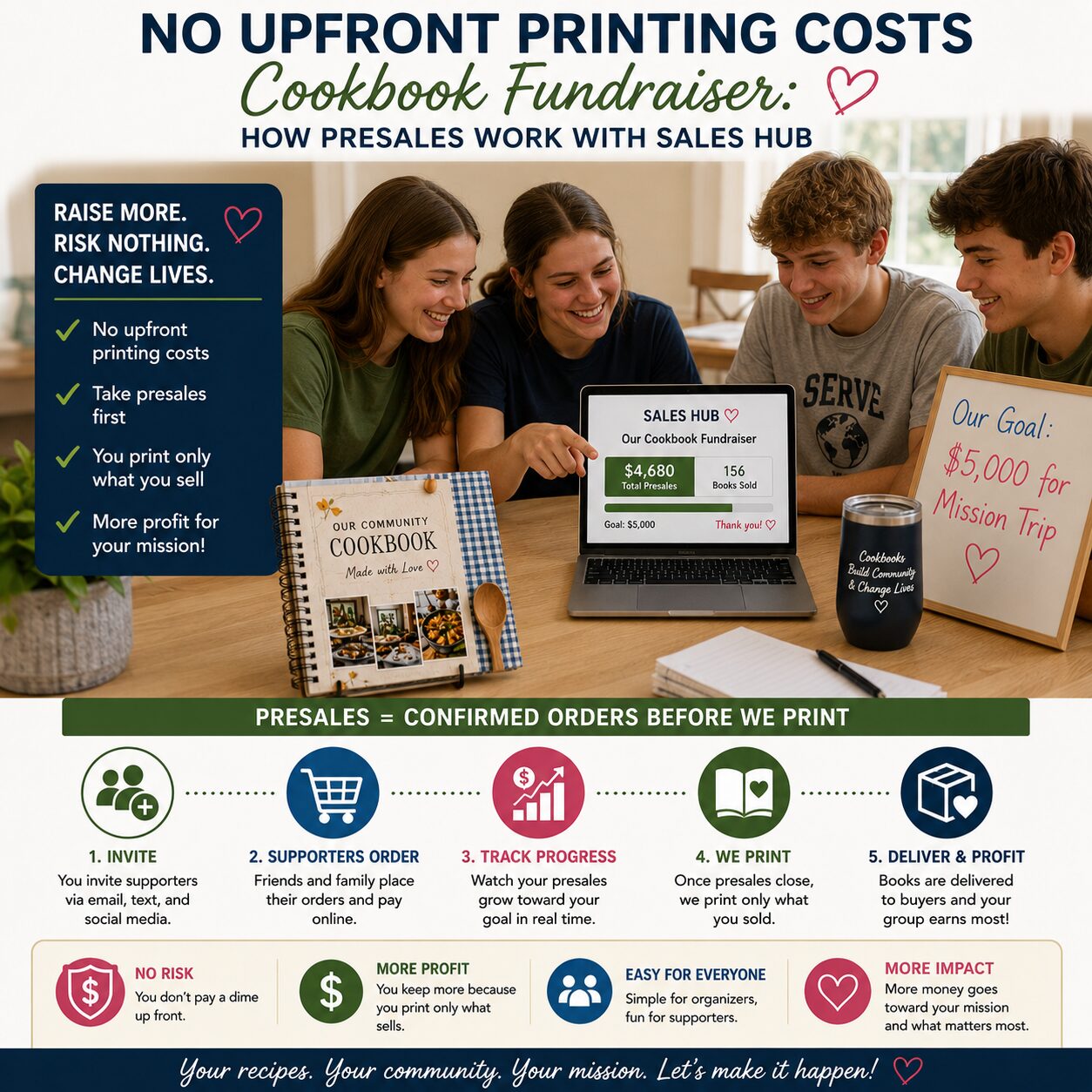
CookbookFundraiser.com flips that script with Sales Hub presales: you sell your cookbooks online before you place the print order. That means no upfront printing costs, less risk, and a much smoother experience for organizers who don’t want to become a part-time warehouse manager.
Here’s how it works, why it works, and how to run it in a way that feels fun (instead of “why did I agree to do this?”).
The core idea: presell first, print second
Sales Hub is built around a simple, very sane principle:
- Launch your fundraiser online
- Collect cookbook orders (and donations) during a set fundraising period
- When the fundraiser ends, place your print order based on real demand
- Receive your proceeds after the fundraising period
CookbookFundraiser.com explicitly promotes this as a way to sell online before placing your print order and avoid paying printing costs up front. Cookbook Fundraiser+1
That changes everything, because it eliminates the biggest anxiety in cookbook fundraising: “What if we guess wrong?”
Why presales are sneakily powerful
Presales aren’t just a payment trick. They’re a strategy upgrade.
You eliminate financial risk
Instead of fronting money and hoping it comes back, you’re collecting orders first. That’s the difference between “fundraiser” and “fundraiser + mild gambling.”
You validate demand with real orders
You learn what your audience actually wants to buy. If you see strong early sales, you can confidently push harder. If sales start slow, you adjust your outreach while there’s still time.
You make it easier for members to participate
Sales Hub supports peer-to-peer fundraising: participants share their link and reach their own friends and family. CookbookFundraiser.com describes this as a built-in peer-to-peer approach that helps groups succeed. Cookbook Fundraiser
You can raise money beyond cookbook sales
The platform also supports donations, and CookbookFundraiser.com notes donations can produce even higher profits. Cookbook Fundraiser
You simplify fulfillment options
You can have cookbooks shipped to you for distribution or sent directly to buyers. Cookbook Fundraiser
Either way, you’re not guessing quantities in the dark.
What “Sales Hub” looks like in real life
Think of Sales Hub as your fundraiser’s command center.
- Your group has a central fundraiser webpage.
- Each participant can have their own member page (with a unique URL) to share with friends and family.
- Sales are credited to the participant who shared the link.
- Organizers can see real-time sales and who’s driving them.
CookbookFundraiser.com describes this member-page setup and tracking directly in its “How To Create A Cookbook Fundraiser” flow. Cookbook Fundraiser
This is what makes presales fun: it turns “please help sell” into a clear, trackable, friendly team effort.
The “No Upfront Printing Costs” promise, explained plainly
Here’s the practical mechanics behind the promise.
During the campaign
- People order the cookbook online (and can donate, too).
- The campaign runs for a defined fundraising period.
- You’re collecting commitments and money before printing.
After the campaign ends
- You finalize/lock the edition you’re printing (so the content doesn’t keep changing).
- You place the print order based on presales (often plus a cushion).
- The platform sends your group its proceeds after the fundraising period—CookbookFundraiser.com notes groups receive a check within two weeks of the conclusion of the fundraising period. Cookbook Fundraiser+1
That “two weeks” detail is important because it affects how you communicate timelines to your supporters and how you plan any expenses you’re covering with the fundraiser. Cookbook Fundraiser+1
Step-by-step: how to run presales with Sales Hub (the organizer version)
This is the flow that keeps the project simple and successful.
1) Decide what you’re selling: custom cookbook or ReadyMade
You can create a custom group cookbook with your members’ recipes, or start faster with a ReadyMade option and personalize it with your group’s name and pages. CookbookFundraiser.com highlights both options. Cookbook Fundraiser
If your goal is a “fast fundraiser,” ReadyMade gets you selling quickly. If your goal is maximum community involvement, a custom cookbook can drive more participation (because contributors become buyers).
2) Set a real campaign timeline (and make it visible)
Presales work best when your fundraiser has:
- a clear start date
- a clear end date
- a clear “books arrive around” expectation
The deadline isn’t pressure—it’s clarity. Without it, “I’ll order later” becomes “I forgot.”
3) Create your Sales Hub pages and sharing kit
Before launch, prepare:
- a short description of what funds support
- 3–5 shareable posts (Facebook, email, text)
- 1 simple graphic (even a phone screenshot of the cover mockup works)
- a one-paragraph “ask” that members can copy/paste
The goal: make sharing embarrassingly easy.
4) Get quick momentum in the first 72 hours
Presales are like pushing a shopping cart with a wonky wheel: once it’s moving, it’s fine. Starting it is the hard part.
Ways to build early momentum:
- ask every participant to share on day one
- ask your core supporters (board, committee, alumni, grandparents) to buy in week one
- post a “live progress update” (“We’re at 37 books in 2 days!”)
5) Use the “middle weeks” for peer-to-peer friendly competition
This is where Sales Hub shines.
You can run:
- “top seller of the week” shoutouts
- “most improved” awards
- team-vs-team competitions (grades, patrols, squads, ministries, sections)
Because the platform tracks contributions and sales by participant, you can keep motivation high without guesswork. Cookbook Fundraiser
6) Run a strong “last call” close
Your final week should include:
- two reminder posts
- one direct email
- one text message prompt to participants (“Share your link one more time today”)
People buy when they’re reminded, and presales are the perfect reason to remind them.
7) Close, lock, print, fulfill
After closing:
- finalize the edition
- place the print order based on presales (plus buffer)
- choose your fulfillment method: ship-to-you or ship-to-buyer Cookbook Fundraiser
Then schedule distribution/pickup or send “shipping updates” depending on your fulfillment choice.
The biggest presale mistake (and how to avoid it)
The #1 regret in presales is: ordering too few copies.
People will buy after they see the finished product. They’ll want gifts. Someone will post a photo and others will suddenly care.
So plan a cushion:
- Order extra copies for late buyers and gifts.
- Keep a small inventory for events, open houses, games, performances, etc.
CookbookFundraiser.com even includes a testimonial-style warning that reprints can happen fast if demand spikes. Cookbook Fundraiser
A few “this will save your sanity” best practices
Show something early
Even if the book isn’t finished, give buyers confidence:
- cover preview
- sample pages
- a list of categories
- a “featured recipe” post
Keep the ask mission-first
People don’t buy because you have a cookbook. They buy because they want to support your cause and get something meaningful in return.
Offer donations prominently
Some supporters don’t need a cookbook. They still want to help. Make “donate” a clear option. CookbookFundraiser.com emphasizes donations as part of the fundraiser model. Cookbook Fundraiser
Communicate the timeline honestly
Presales mean buyers are ordering now and receiving later. That’s fine—just make it clear.
Why this approach feels fun (not stressful)
A presale fundraiser succeeds when it feels like:
- a shared project (recipes and stories)
- a team effort (peer-to-peer sharing)
- a visible goal (live progress)
- a proud result (a real book that lasts)
Sales Hub turns your fundraiser into a mini-campaign with a beginning, a middle, and a celebratory end—without asking you to spend money up front to get started. Cookbook Fundraiser+1
If you’ve ever run a fundraiser where the “administrative overhead” was basically a second job… this is the opposite energy.
Bill Rice is the Co-Publisher of Family Cookbook Project and CookbookFundraiser.com which helps individuals, churches, schools, teams and other fundraising groups create cherished personalized cookbooks using AI tools, peer-to-peer tools and the power of the Internet to meet group funding needs Follow Family Cookbook Project on Facebook, Instagram, Twitter (X), TikTok, YouTube and Pinterest!