The Organizer’s Playbook: Setting Up Your Cookbook Fundraiser in Minutes
Every successful cookbook fundraiser starts the same way: one brave human says, “I can set it up,” and everyone else immediately looks relieved and slightly guilty.
This article is for that brave human.
CookbookFundraiser.com is built so you can get the bones of your fundraiser set up fast, then improve it as you go. The site’s own “Get Started” flow even calls out that most info can be updated later, so you don’t have to get everything perfect on day one. cookbookfundraiser.com
Here’s the organizer-friendly, no-drama setup plan.
The 10-minute mindset: you’re launching a fundraiser page, not writing a novel
Your first job is not to build the final cookbook, collect every recipe, or pick the perfect cover.
Your first job is to:
- create the fundraiser
- set a deadline
- invite people
- start collecting momentum
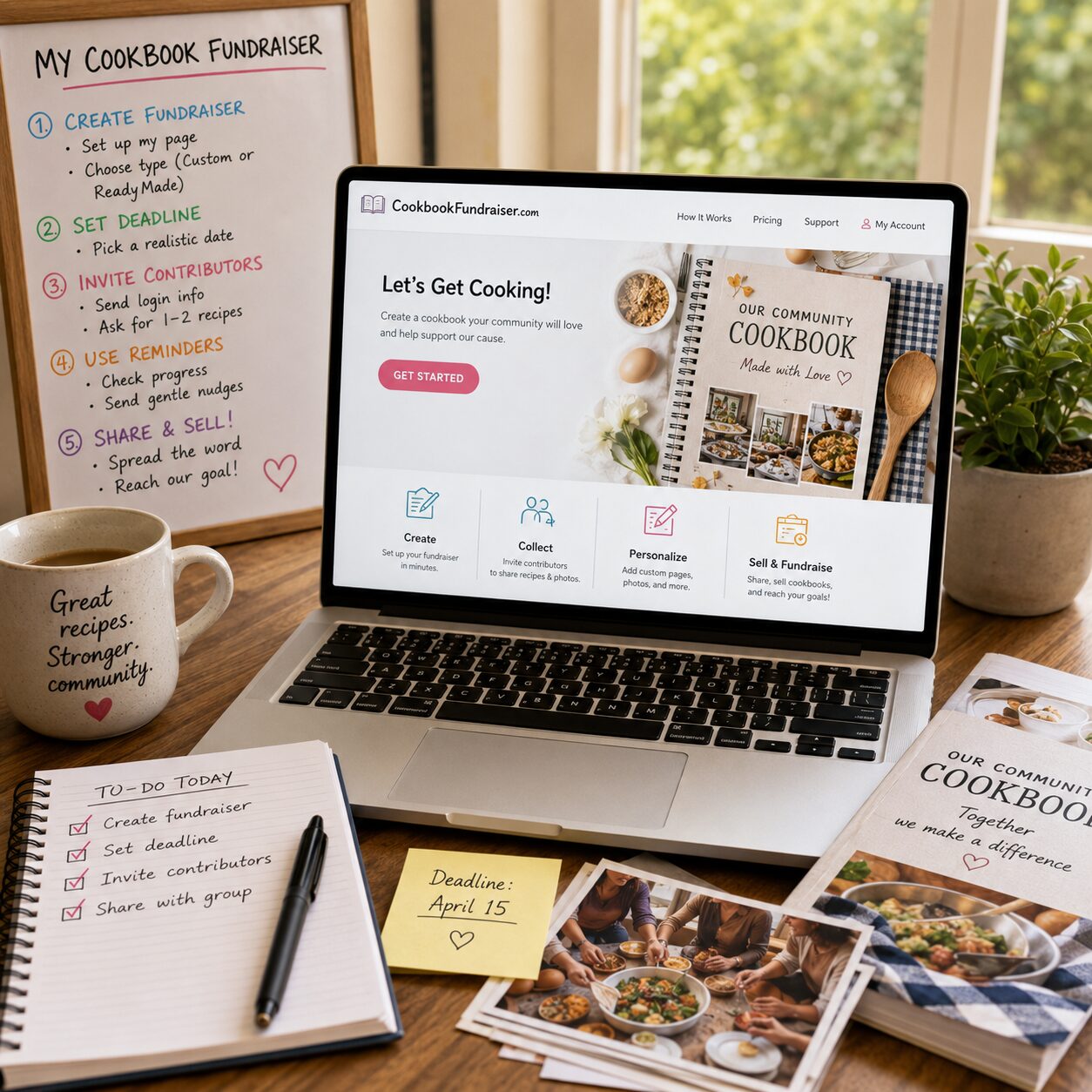
CookbookFundraiser.com’s step-by-step process starts with establishing an editor (you), deciding who contributes, setting a deadline, then getting started and using reminders to keep things moving. cookbookfundraiser.com+1
Step 1: Create the fundraiser (Editor setup)
This is the “plant the flag” moment.
On the Get Started page, you choose the type of cookbook you’re creating (fundraising, church, school, scouting, etc.) and enter basic organizer info like name, email, phone, and group location. cookbookfundraiser.com
Key idea: you can change things later. The goal is simply to get your project created and ready to share. cookbookfundraiser.com
Organizer tip: pick one clear “Editor” who owns deadlines and decisions. The FAQ explicitly explains why there’s only one editor: too many cooks, etc.—but committee members can still help. cookbookfundraiser.com
Step 2: Choose your fundraiser type (custom vs ReadyMade)
Right away you choose your path:
- Custom group cookbook: your members submit recipes and photos, and your group builds something truly personal. cookbookfundraiser.com
- ReadyMade cookbooks: a faster start, using a prebuilt cookbook concept you personalize with your group’s name and custom pages. cookbookfundraiser.com
Quick guidance:
- If you need speed and simplicity: ReadyMade.
- If you want maximum participation (and that “I’m buying it because my recipe is in it” effect): Custom.
CookbookFundraiser.com frames this choice as “Create your own group cookbook or use ReadyMade cookbooks to get started quicker.” cookbookfundraiser.com
Step 3: Personalize the fundraiser page (the “centerpiece”)
Once your fundraiser exists, you personalize your group’s cookbook webpage, which the site describes as the centerpiece of your fundraiser. cookbookfundraiser.com
What to add first (keep it simple):
- Who you are (one sentence)
- What you’re raising money for (one sentence)
- Why it matters (one sentence)
- Deadline (a real date)
- What buyers get (a community cookbook + warm fuzzies + bragging rights)
That’s enough to launch. You can polish later.
Nice-to-have features you can layer in later:
- custom pages with text/photos cookbookfundraiser.com
- adding ads (more on that in a future article, but the platform mentions an Advertising Designer Tool) cookbookfundraiser.com
- an eCookbook option cookbookfundraiser.com
Step 4: Decide how you’ll fundraise (Sales Hub or classic ordering)
This is where you pick your campaign style.
If you’re using Sales Hub, you can run presales and peer-to-peer fundraising, which is designed to get more people involved and reduce organizer headaches. The site describes peer-to-peer features like uploading a membership list and having the system help motivate and reach supporters. cookbookfundraiser.com+1
If you’re not using Sales Hub, you can still run a cookbook fundraiser, collect recipes, and then order books as editor. The Process page describes ordering copies as editor and also mentions a pre-order tool where contributors can say how many they want. cookbookfundraiser.com
Practical rule:
- If you want the smoothest “organized campaign” vibe and participant sharing: Sales Hub.
- If you want simpler internal ordering and local distribution: classic ordering can work.
Step 5: Invite contributors (and make it ridiculously easy)
Your fundraiser grows when people participate.
CookbookFundraiser.com’s Process page emphasizes that you determine contributors and distribute a common username/password, then members log in and type their name so it appears on the recipe. cookbookfundraiser.com
Your job as organizer:
- send the invitation
- provide the login info
- give a clear deadline
- ask for a specific number of recipes (“Please submit 1–2 recipes by March 15”)
Deadlines matter because humans are very good at “later.” The Process page explicitly calls out that asking for a specific number of recipes by a specific date gets people to act. cookbookfundraiser.com
Organizer script you can steal:
“Submit 1 recipe (2 if you’re on a roll) by [date]. If you’re not sure what to add, submit the dish everyone always asks you to bring.”
Step 6: Turn on “gentle pressure” (reminders + special requests)
This is the part where the platform helps you not become a full-time nag.
CookbookFundraiser.com notes it has tools to contact members and remind them to add recipes, plus tools to request beloved/hard-to-find recipes. cookbookfundraiser.com
The Process page also mentions reminder emails being sent automatically as the deadline approaches, and that you can extend the deadline if needed. cookbookfundraiser.com
That combo is gold:
- you set the structure
- the system helps keep the project moving
- your group feels “guided,” not guilt-tripped
Step 7: If using Sales Hub, set up peer-to-peer in one clean move
Peer-to-peer is where cookbook fundraisers get spicy (in a profitable way).
CookbookFundraiser.com describes Sales Hub letting you upload a list of group members so they receive regular reminders to participate—and they receive a personal website they can send to friends and family to gain supporters. cookbookfundraiser.com
That means your organizer work shifts from “selling everything yourself” to “mobilizing a bunch of mini-fundraisers.”
Your setup checklist for participant pages:
- upload member list (or have members register)
- tell members exactly what to do:
- share your personal page 3 times during the campaign
- text 10 people who actually know you
- post once during the final week
CookbookFundraiser.com describes the peer-to-peer approach and the idea of members getting personal pages to share. cookbookfundraiser.com+1
Step 8: Pick your distribution method early (avoid the “book basement”)
Even if you’re not finalizing details yet, decide which direction you’re leaning:
- Ship to buyers
- Bulk ship to the group
- Hybrid (local pickup + ship-to-home for out-of-towners)
CookbookFundraiser.com describes that you can have cookbooks shipped to you for distribution or sent directly to buyers. cookbookfundraiser.com+1
Why decide early?
Because it changes your messaging. “Delivered to your door” is a conversion booster. And it prevents you from accidentally signing yourself up to store 37 boxes next to your holiday decorations.
Step 9: Start “using the cookbook” immediately (this boosts participation)
This is a sneaky organizer move that works.
The Process page recommends starting to use some of the recipes and thanking the people who entered them as a way to show benefits and drive engagement. cookbookfundraiser.com
Translation: post a recipe highlight once or twice a week.
- “Recipe of the week”
- “Best potluck side so far”
- “Coach’s chili has entered the chat”
It makes the project feel alive, not like a spreadsheet with extra steps.
Step 10: Freeze, publish, and order (the finish line)
When you’re ready to go to print, the Process page explains you “freeze” content for the edition you’re publishing. Members can still add recipes for future editions, but not this one. cookbookfundraiser.com
Then you choose:
- dedication text
- cover
- printing specs cookbookfundraiser.com
If you’re using Sales Hub presales, the site explains that preselling can let you avoid upfront printing costs by selling first and printing based on orders. cookbookfundraiser.com
The Organizer’s “Setup in Minutes” checklist
If you want the fastest possible launch, do only these things today:
- Create fundraiser + set yourself as editor cookbookfundraiser.com+1
- Choose Custom vs ReadyMade cookbookfundraiser.com
- Add a basic purpose statement + deadline to your fundraiser page cookbookfundraiser.com+1
- Decide whether you’re using Sales Hub peer-to-peer cookbookfundraiser.com+1
- Send the contributor invite with “1 recipe by [date]” cookbookfundraiser.com
That’s it. Everything else is optimization.
Common setup mistakes (and quick fixes)
Mistake: No deadline
Fix: Set a real date. Deadlines are the difference between “someday” and “done.” cookbookfundraiser.com
Mistake: Asking for too many recipes
Fix: Ask for 1–2. You can always extend or collect more later.
Mistake: One person doing all the sharing
Fix: If you’re using Sales Hub, lean into participant pages and give people a simple sharing assignment. cookbookfundraiser.com+1
Mistake: Waiting too long to show progress
Fix: Post early recipe highlights and celebrate contributors. cookbookfundraiser.com
The takeaway
Setting up a CookbookFundraiser.com campaign doesn’t have to be a “committee project.” The platform is built around a clear organizer role (editor), a simple setup flow you can adjust later, and tools like reminders and Sales Hub participant pages that turn your group into a fundraising team instead of leaving everything on one person’s shoulders. cookbookfundraiser.com+2cookbookfundraiser.com+2
Your job is to launch the engine. The community supplies the fuel.
And ideally, nobody’s basement becomes a cookbook distribution center.
Bill Rice is the Co-Publisher of Family Cookbook Project and CookbookFundraiser.com which helps individuals, churches, schools, teams and other fundraising groups create cherished personalized cookbooks using AI tools, peer-to-peer tools and the power of the Internet to meet group funding needs Follow Family Cookbook Project on Facebook, Instagram, Twitter (X), TikTok, YouTube and Pinterest!